Receipt OCR

Scan a receipt in seconds. In any language.

Point your camera at a receipt — crumpled, dim, foreign menu, handwritten total, doesn't matter. Olik Split pulls every line, price, tax and total in under two seconds. On-device scanning works offline and is free for everyone — Premium adds AI for tougher receipts.
The pain of splitting a receipt by hand

Three reasons people give up halfway through and just round it to "even split"

It takes 4 minutes per receipt

Twelve items, three taxes, four people who all ordered different things. Typing it line-by-line is the longest part of dinner.

You can't read the receipt

Tokyo, Berlin, Lisbon — foreign menus and handwritten totals make manual entry impossible without Google Translate open in another tab.

Other apps charge for it

Splitwise locks OCR behind Pro. Tricount has no scanner at all. Most "free" options give you 3 scans a month and then a paywall.

Two modes, one tap

On-device OCR (Google ML Kit on Android, Apple Vision on iOS) works instantly, offline, with no network. For receipts the camera struggles with — crumpled, faded, handwritten — switch to AI mode and Olik sends a single frame to a third-party AI provider for line-by-line extraction. Premium users get unlimited AI scans; free users unlock a scan with a single rewarded ad.

30+ languages, including handwritten

Latin, Cyrillic, Greek, Arabic, Hebrew, Japanese, Korean, Chinese (simplified + traditional), Devanagari and more. Pick a language manually or let Olik auto-detect from the first line. Works on printed Receipts, handwritten totals at street markets, and partially smudged paper alike.

From receipt to split in 20 seconds

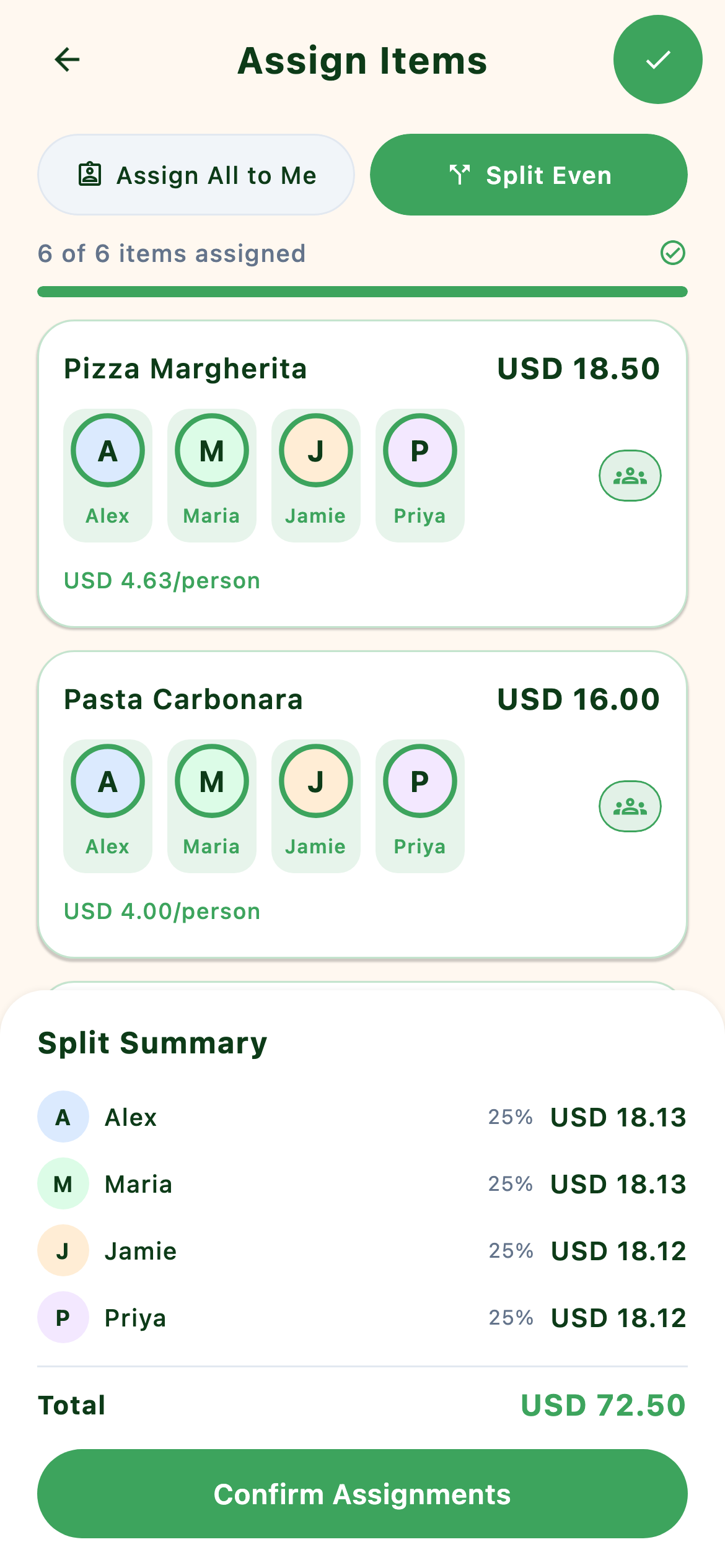
After items are detected, tap each person on each line — or "everyone" for shared. Olik calculates the per-person totals (with tax distributed proportionally), and creates a single group expense with the line-level splits attached. Friends see exactly which items they're paying for.

How it stacks up

Olik Split Splitwise Tricount
On-device OCR Free Paid (Pro)
AI / server-side OCR Premium · 20/day
Languages supported 30+ Latin only
Line-item splitting Yes No No

You're at dinner in Lisbon with three friends. The bill arrives — twelve items, Portuguese names, a 13% IVA, a 5€ service charge. The old way: someone opens a calculator app and starts re-typing "Bacalhau à Brás · 14.50". By the time it's done the wine is warm and someone has rounded up because they're tired.

The Olik way: phone out, camera on, two seconds. The receipt is on screen, every item tagged. Tap each person against each line. Hit save. Total time: under thirty seconds, and every cent is accounted for — including the IVA, which is distributed proportionally across what each person actually ordered.

~3.5 min saved per receipt
$0 free for on-device OCR
30+ languages supported

Common questions

Does the receipt photo leave my phone?

On-device OCR — no. Everything happens locally, even offline. AI mode — the image is uploaded to a private Cloudflare R2 bucket, sent to a third-party AI provider for parsing, and deleted from R2 immediately after. Only the extracted text (line items, total, tax) is stored on the expense.

What does it cost?

On-device OCR is free, forever, with no scan limit. AI scanning is included in Premium (a free trial is available; current pricing is shown in-app at checkout, with regional rates that vary) up to 20 receipts per day. Free users can unlock one AI scan per session by watching a single rewarded ad.

What happens if it misreads a line?

Tap the line and edit. Name, price, quantity — all editable inline. Most errors come from glare or smudged ink, not the language; switching to AI mode usually fixes those.

Can I scan multiple pages of a long receipt?

Yes. Take several photos in sequence and Olik merges them into a single expense with all line items grouped together.

Which on-device OCR languages are supported?

Latin (90+ languages: English, Spanish, French, German, Italian, Portuguese, Polish, Turkish, etc.), Cyrillic (Russian, Ukrainian, Bulgarian, etc.), Greek, Devanagari (Hindi, Marathi), Arabic, Hebrew, Japanese, Korean, Chinese (simplified and traditional). AI mode handles anything readable, including handwritten.

Stop typing receipts.

Free, works offline, ready when you open dinner.